|
In this section, you will learn about third-angle orthographic projection. At this stage, you should have a good understanding of orthographic projection. The second method of projection is known as third-angle orthographic projection, often referred to as the American projection.
The difference between the two methods is in where we place the object with regard to the principal planes. In first-angle orthographic projection, we place the object in front of the reference planes. In third-angle orthographic projection, we place the object behind the reference planes. The most visible difference between the drawings is the arrangement of the views. In first-angle orthographic projection, we project the left view and the top view across the front view to the far side. In third-angle orthographic projection, we project the left view and the top view adjacent (next to) the face of the object being viewed. The three primary views used in this unit for third-angle orthographic projection are:
- The front view
- The top view
- The right view.
Figure 3.18 shows an object positioned in space in the third quadrant. We have drawn views of the object on the planes using sets of parallel projectors perpendicular to the planes. The front view is placed on the vertical plane. The right view is placed on the auxiliary vertical plane adjacent to the vertical plane. The top view is placed on the horizontal plane. Figure 3.18 shows the layout of the views.
Once we have obtained the views on the reference planes, we rebate the horizontal plane and the auxiliary vertical plane. This means that we fold them out through an angle of 90° until all three orthographic views appear in a single two-dimensional surface. At this stage, we have the three views shown in Figure 3.18
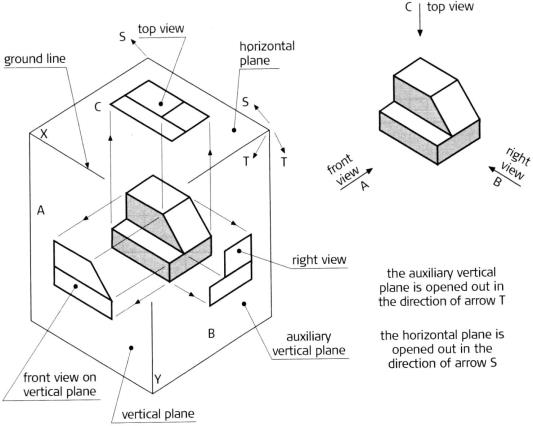
Figure 3.17
An object positioned in space in the third quadrant
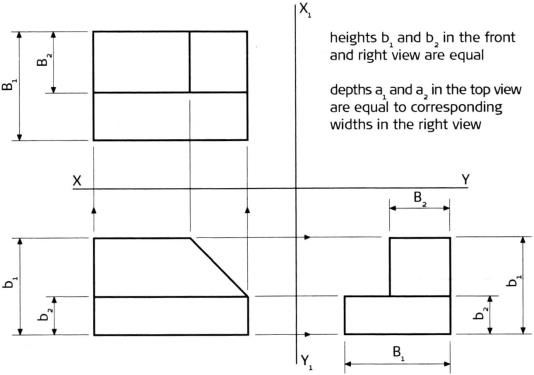
Figure 3.18
A third-angle orthographic projection of the front, top and right views
|
 Resource Centre
  Student Stationery
 Media Centre
 Student Portal
 Refer to the Student Portal for additional resources related to this module.